
Overview
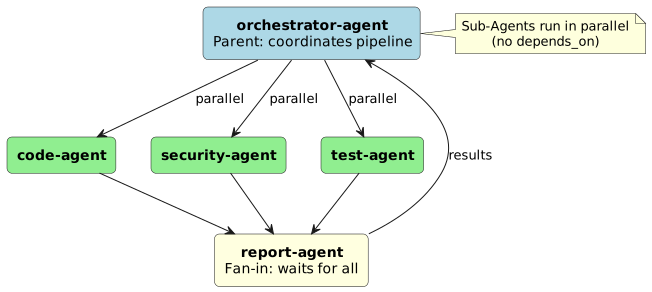
Kiro CLI allows us to configure an orchestrator agent that executes specialized sub-agents in parallel. Each sub-agent has its own tools, permissions, and MCP servers – the parent’s trust settings are not inherited.
Architecture
Step 1: Define Specialized Agents
We give each sub-agent its own JSON configuration under .kiro/agents/.
.kiro/agents/code-agent.json{
"name": "code-agent",
"description": "Implements features and writes code",
"prompt": "You are an experienced Kotlin/Java developer. Write clean, tested code.",
"tools": ["read", "write", "shell", "code", "grep"],
"allowedTools": ["read", "code", "grep"],
"toolsSettings": {
"write": {
"allowedPaths": ["./src/**", "./tests/**"],
"deniedPaths": ["./.env", "./secrets/**"]
},
"shell": {
"allowedCommands": ["mvn test", "mvn compile"],
"autoAllowReadonly": true
}
}
}.kiro/agents/security-agent.json{
"name": "security-agent",
"description": "Reviews code for security vulnerabilities (OWASP, Injection, Auth)",
"prompt": "You are a security auditor. Review code for OWASP Top 10 vulnerabilities.",
"tools": ["read", "grep", "code", "shell"],
"allowedTools": ["read", "grep", "code"],
"toolsSettings": {
"shell": {
"allowedCommands": ["mvn dependency-check:check"],
"denyByDefault": true
}
}
}.kiro/agents/test-agent.json{
"name": "test-agent",
"description": "Writes and executes tests",
"prompt": "You write JUnit 5 tests with AssertJ. Cover happy path, edge cases, and errors.",
"tools": ["read", "write", "shell", "code"],
"allowedTools": ["read", "code"],
"toolsSettings": {
"write": {
"allowedPaths": ["./src/test/**"]
},
"shell": {
"allowedCommands": ["mvn test", "mvn verify"],
"autoAllowReadonly": true
}
}
}Step 2: Configure the Orchestrator Agent
The orchestrator defines which sub-agents are available and trusted.
.kiro/agents/orchestrator.json{
"name": "orchestrator",
"description": "Coordinates specialized agents for feature development",
"prompt": "You orchestrate multiple agents. Use parallel stages where possible.",
"tools": ["read", "subagent", "code"],
"allowedTools": ["read", "code", "subagent"],
"toolsSettings": {
"crew": {
"availableAgents": ["code-agent", "security-agent", "test-agent", "report-agent"],
"trustedAgents": ["code-agent", "security-agent", "test-agent"]
}
}
}
|
We can list available agents with:
/agents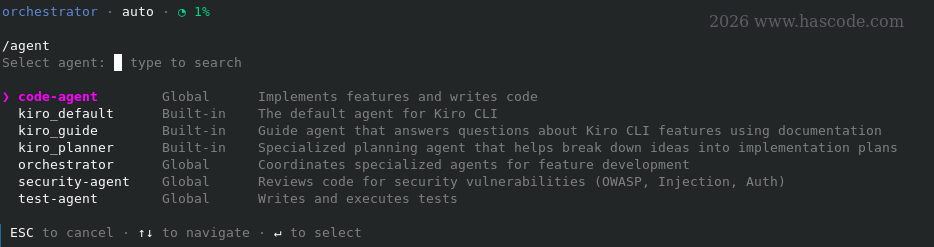
Step 3: Use the Pipeline (Fan-out / Fan-in)
To demonstrate the agents in action, we’re using a REST app from an old blog article: Java EE 7 Database Migrations with Liquibase and WildFly.
The orchestrator will automatically use the subagent tool when instructed:
# Start the orchestrator agent
kiro-cli chat --agent orchestrator

# Then in chat:
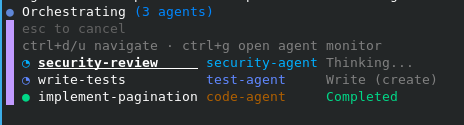
> Implement pagination for /book, check security, and write tests – all in parallel.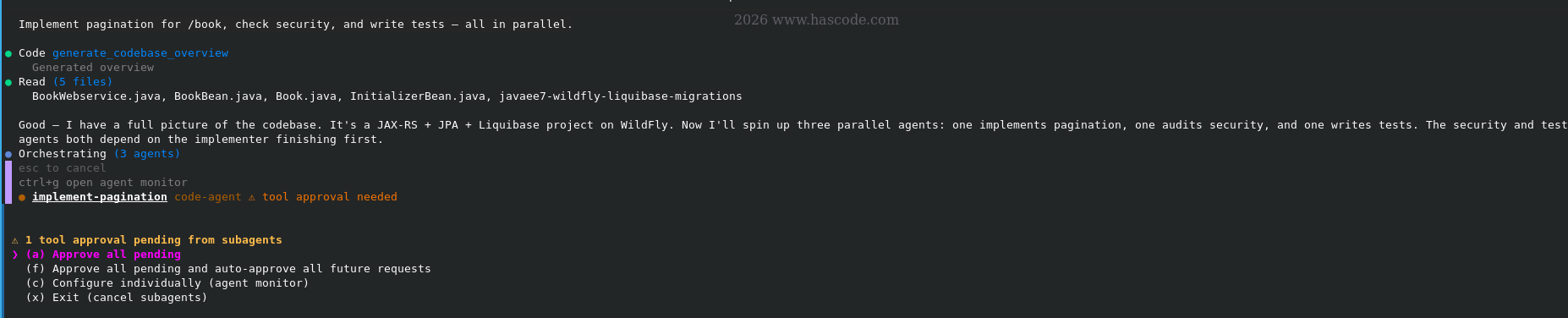
Internally, the orchestrator creates a pipeline like:
{
  "task": "Implement pagination for /book API",
  "stages": [
    {
      "name": "implement",
      "role": "code-agent",
      "prompt_template": "Implement {task}"
    },
    {
      "name": "security-check",
      "role": "security-agent",
      "prompt_template": "Check the security of {task}"
    },
    {
      "name": "write-tests",
      "role": "test-agent",
      "prompt_template": "Write tests for {task}"
    }
  ]
}
Stages without depends_on start immediately in parallel.
Monitoring
We can monitor running sub-agent sessions with:
-
Ctrl+G– Open Agent Monitor (shows status of all stages) -
Each stage runs as its own session
Important Rules
| Rule | Meaning |
|---|---|
No trust inheritance |
Each sub-agent needs its own |
Fail-fast |
If a stage fails, all running sibling stages are cancelled |
No sub-sub-agents |
Sub-agents cannot spawn further sub-agents themselves |
Own MCP servers |
Each sub-agent loads MCP servers from its own config |
Sessions not persistent |
Sub-agent sessions end after stage completion |
Summary
-
We create specialized agents with their own tools/permissions under
.kiro/agents/ -
We configure the orchestrator agent with
crewsettings (availableAgents,trustedAgents) -
Pipeline stages are automatically executed in parallel (without
depends_on) or sequentially (withdepends_on) -
We monitor progress via
Ctrl+G
Appendix A: Changes made
But what about the changes to the application?
kiro has …
-
added a bunch of new test dependencies …
<!-- Test dependencies --> <dependency> <groupId>junit</groupId> <artifactId>junit</artifactId> <version>4.13.2</version> <scope>test</scope> </dependency> <dependency> <groupId>org.mockito</groupId> <artifactId>mockito-core</artifactId> <version>4.11.0</version> <scope>test</scope> </dependency> <!-- Jersey server supplies the JAX-RS RuntimeDelegate implementation needed to instantiate javax.ws.rs.core.Response outside a container. --> <dependency> <groupId>org.glassfish.jersey.core</groupId> <artifactId>jersey-server</artifactId> <version>2.34</version> <scope>test</scope> </dependency> -
has updated at least to
Java 8(yes the app and the tutorial I have recycled here are indeed very old ….)<source>1.8</source> <target>1.8</target> -
has updated the
BookBean:/** * Returns a single page of books. * * @param page zero-based page index * @param size number of records per page */ public List<Book> findAll(int page, int size) { return em.createNamedQuery(Book.Query.FIND_ALL, Book.class).setFirstResult((int) Math.min((long) page * size, Integer.MAX_VALUE)) .setMaxResults(size) .getResultList(); } -
has updated the
BookWebservice(shortened):@GET @Produces(MediaType.APPLICATION_JSON) public Response getBooks( @QueryParam("page") @DefaultValue("0") int page, @QueryParam("size") @DefaultValue("20") int size) { // ---- input validation ------------------------------------------------ if (page < 0) { return badRequest("page must be >= 0"); } if (size < 1 || size > MAX_SIZE) { return badRequest("size must be between 1 and " MAX_SIZE); } // ---------------------------------------------------------------------- long total = bookBean.countAll(); PagedResult<Book> result = new PagedResult<>( bookBean.findAll(page, size), page, size, total); return Response.ok(result).build(); }
More about kiro
see Kiro Snippets