Postgres with docker-compose or Docker and pg_stat_statements enabled

pg_stat_statements is useful to gather performance information about queries so lets add it to our dockerized postgres database. Using docker-compose Using docker-compose we just need to add the following docker-compose.yaml: docker-compose.yml version: '3.5' services: postgres: container_name: postgres_container image: postgres ports: - "5432:5432" volumes: - /var/lib/postgresql/data # used for query profiling, deactivate for enhanced performance command: postgres -c shared_preload_libraries=pg_stat_statements -c pg_stat_statements.track=all -c max_connections=200 environment: POSTGRES_USER: postgres POSTGRES_PASSWORD: thepassword We simply start our Postgres database with docker-compose: ...
March 29, 2023 · 1 min · 212 words · Micha Kops

Setting up multiple Postgresql Instances with docker-compose

A simple setup when two Postgres databases prefilled with schema/data needed. docker-compose.yml version: '3.6' services: postgres1: image: postgres restart: always environment: - DATABASE_HOST=127.0.0.1 - POSTGRES_USER=root - POSTGRES_PASSWORD=root - POSTGRES_DB=root ports: - "15432:15432" volumes: - ./postgres1-init.sql:/docker-entrypoint-initdb.d/docker_postgres_init.sql postgres2: image: postgres restart: always environment: - DATABASE_HOST=127.0.0.1 - POSTGRES_USER=root - POSTGRES_PASSWORD=root - POSTGRES_DB=root ports: - "25432:25432" volumes: - ./postgres2-init.sql:/docker-entrypoint-initdb.d/docker_postgres_init.sql And our sample init scripts: CREATE USER tester WITH PASSWORD 'tester' CREATEDB; CREATE DATABASE testdb WITH OWNER = tester ENCODING = 'UTF8' LC_COLLATE = 'en_US.utf8' LC_CTYPE = 'en_US.utf8' TABLESPACE = pg_default CONNECTION LIMIT = -1; ...

February 8, 2022 · 1 min · 90 words · Micha Kops

WordPress Docker Setup

Goals Run WordPress via Docker / Docker-Compose Increase the Upload Filesize Limit Create Docker Compose Configuration Create a docker-compose.yml: version: '3.1' services: wordpress: image: wordpress restart: always ports: - 8080:80 environment: WORDPRESS_DB_HOST: db WORDPRESS_DB_USER: exampleuser WORDPRESS_DB_PASSWORD: examplepass WORDPRESS_DB_NAME: exampledb volumes: - wordpress:/var/www/html db: image: mysql:5.7 restart: always environment: MYSQL_DATABASE: exampledb MYSQL_USER: exampleuser MYSQL_PASSWORD: examplepass MYSQL_RANDOM_ROOT_PASSWORD: '1' volumes: - db:/var/lib/mysql volumes: wordpress: db: Run Docker Compose / Start Containers docker-compose up WARNING: Found orphan containers (wordpress-docker_phpmyadmin_1) for this project. If you removed or renamed this service in your compose file, you can run this command with the --remove-orphans flag to clean it up. Starting wordpress-docker_db_1 ... done Starting wordpress-docker_wordpress_1 ... done Attaching to wordpress-docker_db_1, wordpress-docker_wordpress_1 [..] db_1 | 2021-04-03T18:58:17.247963Z 0 [Note] mysqld: ready for connections. db_1 | Version: '5.7.33' socket: '/var/run/mysqld/mysqld.sock' port: 3306 MySQL Community Server (GPL) ...

May 14, 2021 · 1 min · 204 words · Micha Kops

Using jOOQ and Build Helper Plugin to Generate Database Metamodels with Maven

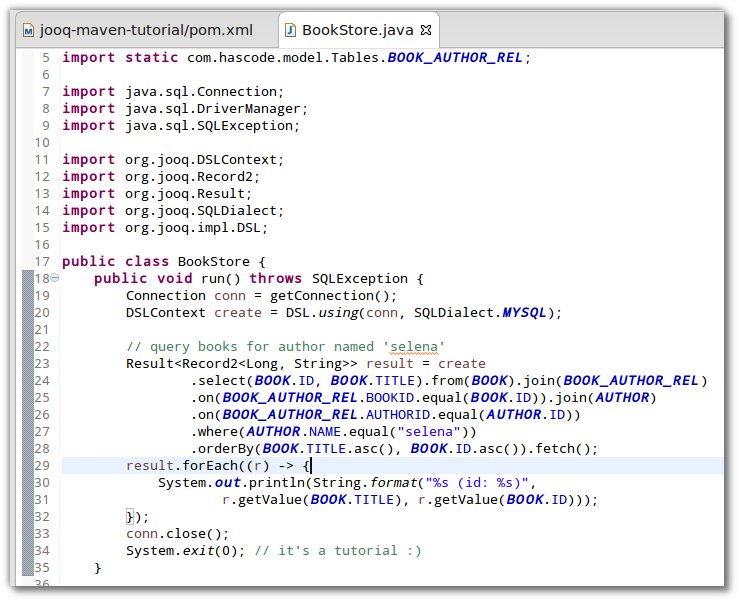
When you need to derive meta-models from existing databases and want to create type-safe queries with an elegant, fluent-API, jOOQ definitely is a tool to consider here. In the following tutorial I’d like to demonstrate how to integrate the jOOQ meta-model generator into a Maven build using the jOOQ Maven Plug-in, the Build Helper Maven Plug-in and Maven profiles to finally create a running application to query an existing RDBMS using such a generated meta-model. ...

June 10, 2014 · 7 min · 1363 words · Micha Kops

Creating elegant, typesafe Queries for JPA, mongoDB Morphia and Lucene using Querydsl

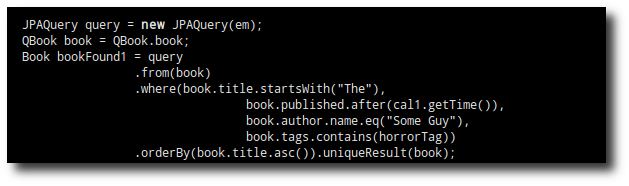
Querydsl is a framework that allows us to create elegant, type-safe queries for a variety of different data-sources like Java Persistence API (JPA) entities, Java Data Objects (JDO), mongoDB with Morphia, SQL, Hibernate Search up to Lucene. In the following tutorial we’re implementing example queries for different environments – Java Persistence API compared with a JPQL and a criteria API query, mongoDB with Morphia and last but not least for Lucene. ...

February 13, 2014 · 9 min · 1879 words · Micha Kops

MyBatis Snippets

Use List of Parameters in Annotation-based Query Possible using MyBatis Dynamic SQL feature package com.hascode.example.mybatis; import org.apache.ibatis.annotations.Mapper; import org.apache.ibatis.annotations.Param; import org.apache.ibatis.annotations.Select; import java.util.List; @Mapper public interface SampleMapper { @Select({"<script>", "SELECT sample.bar", "FROM sampletable sample", "WHERE sample.id IN", "<foreach item='item' index='index' collection='ids'", "open='(' separator=',' close=')'>", "#{item}", "</foreach>", "</script>"}) List<Foo> getSamplesMatchingIds(@Param("ids") List<String> ids); } The mapper may now be used with a list of parameter objects: var samples = sampleMapper.getSamplesMatchingIds(List.of("24059e5b-aa07-424d-855e-50f499b8f697", "65140fc0-fc9f-42d2-9531-5e5d6caeba30")); Call a Procedure package com.hascode.example.mybatis; import org.apache.ibatis.annotations.Mapper; import org.apache.ibatis.annotations.Options; import org.apache.ibatis.annotations.Select; import org.apache.ibatis.mapping.StatementType; @Mapper public interface SampleMapper { @Select("CALL SCHEMA.CL.setScope(#{scope})") @Options(statementType = StatementType.CALLABLE) void setScope(int scope); } ...

March 1, 2010 · 1 min · 101 words · Micha Kops

Postgres Snippets

Administration & Configuration Connections Show Max Connections (value and source) SELECT setting, source, sourcefile, sourceline FROM pg_settings WHERE name = 'max_connections'; Set Max Connections ALTER system SET max_connections = 250; Kill Connections for a Database SELECT pg_terminate_backend(pid) FROM pg_catalog.pg_stat_activity -- we don't want to kill our own connection WHERE pid != pg_backend_pid() -- we don't want to kill connections to other databases AND datname = 'MYDATABASE' Show Statement Timeout Settings for All Users SELECT r.rolname, (SELECT unnest(s.setconfig) FROM pg_db_role_setting s WHERE s.setrole = r.oid AND s.setconfig::text LIKE '%statement_timeout%' LIMIT 1) AS statement_timeout FROM pg_roles r WHERE r.rolcanlogin ORDER BY r.rolname; ...

March 1, 2010 · 11 min · 2278 words · Micha Kops

SQL Snippets

Count unique / all values SELECT COUNT(DISTINCT <FIELDNAME>), COUNT(ALL <FIELDNAME>) FROM <TABLE>; Partially anonymize e-mail addresses UPDATE <TABLE_NAME> SET <EMAIL_FIELD>= INSERT( <EMAIL_FIELD>, POSITION('@' IN <EMAIL_FIELD>), 100, CONCAT(FLOOR(1 + (RAND() * 100)),'@hascode.com')) WHERE POSITION('@' IN <EMAIL_FIELD>)>0; Find duplicate entries SELECT COUNT(*), <FIELDNAME> FROM <TABLENAME> GROUP BY <FIELDNAME> HAVING COUNT(*)>1; MySQL Fix Zero Dates for Data Imports Error: ERROR 1067 (42000) at line 1234: Invalid default value for ‘datefield’ In newer MySQL Versions zero in date or zero dates are forbidden .. check this with: ...

March 1, 2010 · 1 min · 150 words · Micha Kops