
Testing RESTful Web Services made easy using the REST-assured Framework
October 23rd, 2011 by Micha Kops There are many frameworks out there to facilitate testing RESTful webservices but there is one framework I’d like to acquaint you with my favourite framework named REST-assured.
REST-assured offers a bunch of nice features like a DSL-like syntax, XPath-Validation, Specification Reuse, easy file uploads and those features we’re going to explore in the following article.
With a few lines of code and Jersey I have written a RESTful web service that allows us to explore the features of the REST-assured framework and to run tests against this service.
Contents
- Prerequisites
- The REST Service to be tested
- Adding REST-assured to your Maven project
-
Examples
- Verify JSON GET Request
- Using JsonPath
- Using Groovy Closures
- Verifying XML
- XML using XPath
- XML verification vs a Schema
- Handling Request Parameters
- HTTP Status Code
- Authentication
- Setting HTTP Headers
- Verifying HTTP Headers
- Setting Cookies
- Verifying Cookies
- File Uploads
- Registering custom parsers for MIME-types
- Specification reuse
- Troubleshooting
- Tutorial Sources
- Slideshow
- Resources
- Additional REST articles of mine
- Article Updates
Prerequisites
We’re going to need a JDK and Maven .. nothing more …
The REST Service to be tested
I have added a demo web application that exposes a RESTful service (Jersey used here) and allows us to run our tests against it. There are two possible ways to run the web app:
- Check out the tutorial sources (see chapter “Tutorial Sources Download“) and run
mvn tomcat:run
- Or simply download the following war file from my Bitbucket repository and deploy it to a valid web container like Tomcat, Jetty etc..
- If you’re running the app and open the URL http://localhost:8080 in your browser you should be able to see a nice overview of the exported service methods
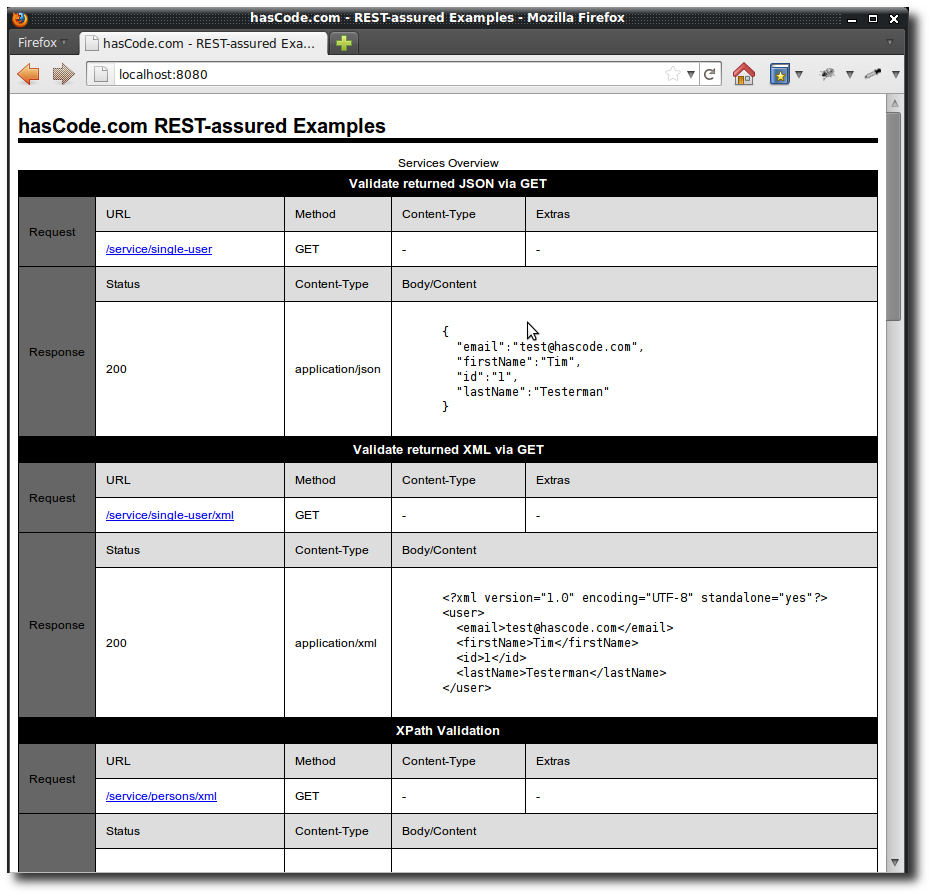
REST Service Overview
Adding REST-assured to your Maven project
You only need to add the following dependencies to your pom.xml to use REST-assured and – of course JUnit..
<dependency>
 <groupId>junit</groupId>
 <artifactId>junit</artifactId>
 <version>4.10</version>
 <scope>test</scope>
</dependency>
<dependency>
 <groupId>com.jayway.restassured</groupId>
 <artifactId>rest-assured</artifactId>
 <version>1.4</version>
 <scope>test</scope>
</dependency>
Examples
I have added some examples for different scenarios to test .. headers, status codes, cookies, file uploads etc ..
Verify JSON GET Request
We’re testing a simple response containing some JSON data here ..
- Request URL: /service/single-user
- Request Method: GET
- Response Content-Type: application/json
- Response Body:
{
  "email":"test@hascode.com",
  "firstName":"Tim",
  "id":"1",
  "lastName":"Testerman"
}
And this is our test case:
@Test
public void testGetSingleUser() {
  expect().
    statusCode(200).
    body(
      "email", equalTo("test@hascode.com"),
      "firstName", equalTo("Tim"),
      "lastName", equalTo("Testerman"),
      "id", equalTo("1")).
    when().
    get("/service/single-user");
}
Using JsonPath
This time we’re using JsonPath to programatically test the returned JSON structure..
- Request URL: /service/single-user
- Request Method: GET
- Response Content-Type: application/json
- Response Body
{
  "email":"test@hascode.com",
  "firstName":"Tim",
  "id":"1",
  "lastName":"Testerman"
}
And this is our test:
@Test
public void testGetSingleUserProgrammatic() {
  Response res = get("/service/single-user");
  assertEquals(200, res.getStatusCode());
  String json = res.asString();
  JsonPath jp = new JsonPath(json);
  assertEquals("test@hascode.com", jp.get("email"));
  assertEquals("Tim", jp.get("firstName"));
  assertEquals("Testerman", jp.get("lastName"));
  assertEquals("1", jp.get("id"));
}
Using Groovy Closures
JsonPath allows us to use Groovy closures to perform searches on the returned JSON structure.
- Request URL: /service/persons/json
- Request Method: GET
- Response Content-Type: application/json
- Response Body
{
	"person":[
	{
		"@id":"1",
		"email":"test@hascode.com",
		"firstName":"Tim",
		"lastName":"Testerman"
	},{
		"@id":"20",
		"email":"dev@hascode.com",
		"firstName":"Sara",
		"lastName":"Stevens"
	},{
		"@id":"11",
		"email":"devnull@hascode.com",
		"firstName":"Mark",
		"lastName":"Mustache"
	}
	]
}
And this is our test – we’re searching for a person whose email matches the pattern /test@/:
@Test
public void testFindUsingGroovyClosure() {
  String json = get("/service/persons/json").asString();
  JsonPath jp = new JsonPath(json);
  jp.setRoot("person");
  Map person = jp.get("find {e -> e.email =~ /test@/}");
  assertEquals("test@hascode.com", person.get("email"));
  assertEquals("Tim", person.get("firstName"));
  assertEquals("Testerman", person.get("lastName"));
}
Verifying XML
Now we’re going to validate returned XML
- Request URL: /service/single-user/xml
- Request Method: GET
- Response Content-Type: application/xml
- Response Body
<?xml version="1.0" encoding="UTF-8" standalone="yes"?>
<user>
  <email>test@hascode.com</email>
  <firstName>Tim</firstName>
  <id>1</id>
  <lastName>Testerman</lastName>
</user>
And this is our test:
@Test
public void testGetSingleUserAsXml() {
  expect().
    statusCode(200).
    body(
      "user.email", equalTo("test@hascode.com"),
      "user.firstName", equalTo("Tim"),
      "user.lastName", equalTo("Testerman"),
      "user.id", equalTo("1")).
    when().
    get("/service/single-user/xml");
}
XML using XPath
To validate complex XML structure XPath is way more comfortable here..
- Request URL: /service/persons/xml
- Request Method: GET
- Response Content-Type: application/xml
- Response Body
<?xml version="1.0" encoding="UTF-8" standalone="yes"?>
<people>
  <person id="1">
    <email>test@hascode.com</email>
    <firstName>Tim</firstName>
    <lastName>Testerman</lastName>
  </person>
  <person id="20">
    <email>dev@hascode.com</email>
    <firstName>Sara</firstName>
    <lastName>Stevens</lastName>
  </person>
  <person id="11">
    <email>devnull@hascode.com</email>
    <firstName>Mark</firstName>
    <lastName>Mustache</lastName>
  </person>
</people>
And this is our test:
@Test
public void testGetPersons() {
 expect()
 .statusCode(200)
 .body(hasXPath("//*[self::person and self::person[@id='1'] and self::person/email[text()='test@hascode.com'] and self::person/firstName[text()='Tim'] and self::person/lastName[text()='Testerman']]"))
 .body(hasXPath("//*[self::person and self::person[@id='20'] and self::person/email[text()='dev@hascode.com'] and self::person/firstName[text()='Sara'] and self::person/lastName[text()='Stevens']]"))
 .body(hasXPath("//*[self::person and self::person[@id='11'] and self::person/email[text()='devnull@hascode.com'] and self::person/firstName[text()='Mark'] and self::person/lastName[text()='Mustache']]"))
 .when().get("/service/persons/xml");
}
XML verification vs a Schema
Now we’re going to validate the xml returned against a XML schema file
- Request URL: /service/single-user/xml
- Request Method: GET
- Response Content-Type: application/xml
- Response Body
<?xml version="1.0" encoding="UTF-8" standalone="yes"?>
<user>
  <email>test@hascode.com</email>
  <firstName>Tim</firstName>
  <id>1</id>
  <lastName>Testerman</lastName>
</user>
This is the schema we’re using to validate in a file named user.xsd
<?xml version="1.0" encoding="UTF-8"?>
<schema xmlns="http://www.w3.org/2001/XMLSchema">

	<element name="user">
		<complexType>
			<sequence>
				<element name="email">
					<simpleType>
						<restriction base="string">
							<pattern value=".+@.+"></pattern>
						</restriction>
					</simpleType>
				</element>
				<element name="firstName" type="string"></element>
				<element name="id" type="int"></element>
				<element name="lastName" type="string"></element>
			</sequence>
		</complexType>
	</element>
</schema>
And this is our test case:
@Test
public void testGetSingleUserAgainstSchema() {
  InputStream xsd = getClass().getResourceAsStream("/user.xsd");
  assertNotNull(xsd);
  expect().
  statusCode(200).
  body(
    matchesXsd(xsd)).
  when().
  get("/service/single-user/xml");
}
Handling Request Parameters
This is a simple example how to add some request parameters
- Request URL: /service/user/create
- Request Method: GET
- Response Content-Type: application/json
- Response Body
{
  "email":"test@hascode.com",
  "firstName":"Tim",
  "id":"1",
  "lastName":"Testerman"
}
And this is our test:
@Test
public void testCreateuser() {
  final String email = "test@hascode.com";
  final String firstName = "Tim";
  final String lastName = "Tester";

  given().
    parameters(
      "email", email,
      "firstName", firstName,
      "lastName", lastName).
  expect().
    body("email", equalTo(email)).
    body("firstName", equalTo(firstName)).
    body("lastName", equalTo(lastName)).
  when().
  get("/service/user/create");
}
HTTP Status Code
Now an example how to verify HTTP headers – in the following example, a 404 Page Not Found is returned ..
- Request URL: /service/status/notfound
- Request Method: GET
- Response Content-Type: text/plain
- Response Status: 404 / Page Not Found
And this is our test:
@Test
public void testStatusNotFound() {
  expect().
    statusCode(404).
  when().
  get("/service/status/notfound");
}
Authentication
In this example we’re handling basic authentication ..
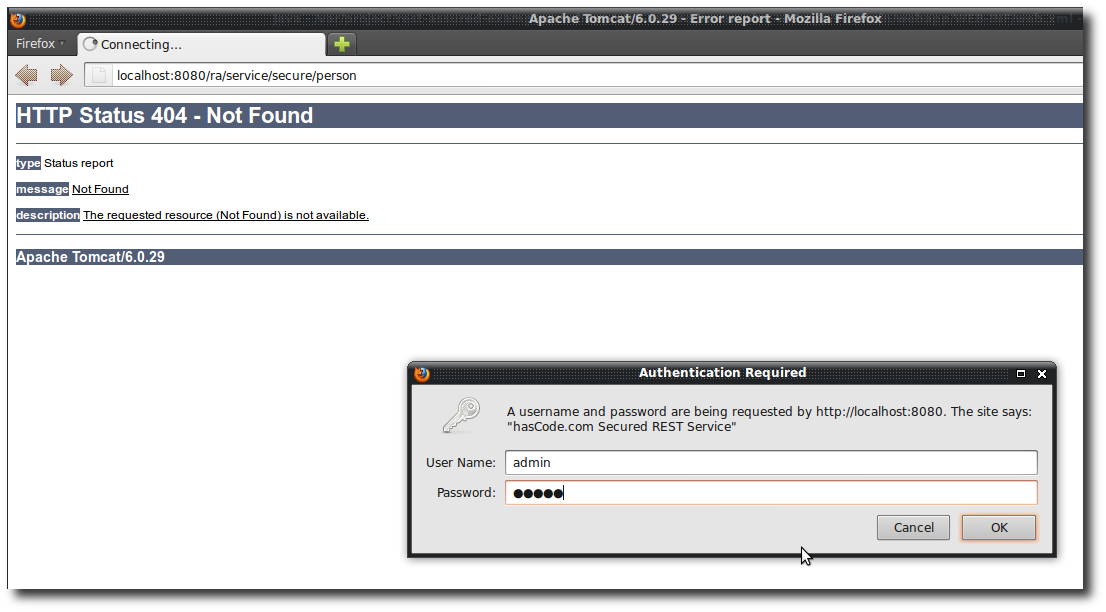
Basic Authentication secured REST Service
- Request URL: /service/secure/person
- Request Method: GET
- Response Content-Type: text/plain
- Response Status: 401 Unauthorized/ 200 Status Ok (when logged in with username=admin and password=admin)
And this is our test:
@Test
public void testAuthenticationWorking() {
  // we're not authenticated, service returns "401 Unauthorized"
  expect().
    statusCode(401).
  when().
  get("/service/secure/person");

  // with authentication it is working
  expect().
    statusCode(200).
  when().
    with().
      authentication().basic("admin", "admin").
  get("/service/secure/person");
}
Setting HTTP Headers
In the following example we’re setting some HTTP headers. The value of the HTTP header named “myparam” is returned by the REST service in the response body..
- Request URL: /service/single-user
- Request Method: GET
- Response Content-Type: text/plain
- Response Body: #value-of-myparam#
And this is our test:
@Test
public void testSetRequestHeaders() {
  expect().
    body(equalTo("TEST")).
  when().
    with().
    header("myparam", "TEST").
  get("/service/header/print");

  expect().
    body(equalTo("foo")).
  when().
    with().
    header("myparam", "foo").
  get("/service/header/print");
}
Verifying HTTP Headers
Now we’re going to verify HTTP response headers
- Request URL: /service/header/multiple
- Request Method: GET
- Response Content-Type: text/plain
- Response Header: customHeader1:foo, anotherHeader:bar
And this is our test:
@Test
public void testReturnedHeaders() {
  expect().
    headers("customHeader1", "foo", "anotherHeader", "bar").
  when().
  get("/service/header/multiple");
}
Setting Cookies
The following example shows how to set cookies. The REST service sends a 403 / Forbidden until a cookie with name=authtoken and value=abcdef is send.
- Request URL: /service/access/cookie-token-secured
- Request Method: GET
- Response Content-Type: application/json
- Response Status: 403 / 200
And this is our test:
@Test
public void testAccessSecuredByCookie() {
  expect().
    statusCode(403).
  when().
  get("/service/access/cookie-token-secured");

  given().
    cookie("authtoken", "abcdef").
  expect().
    statusCode(200).
  when().
  get("/service/access/cookie-token-secured");
}
Verifying Cookies
This is how to verify cookies set by the service. The service returns the request parameter “name” as the value of the cookie named “userName”:
- Request URL: /service/cookie/modify
- Request Method: GET
- Request Parameter: name
- Response Cookie: userName:#value-of-name#
And this is our test:
@Test
public void testModifyCookie() {
  expect().
    cookie("userName", equalTo("Ted")).
  when().
    with().param("name", "Ted").
  get("/service/cookie/modify");

  expect().
    cookie("userName", equalTo("Bill")).
  when().
    with().param("name", "Bill").
  get("/service/cookie/modify");
}
File Uploads
The following example shows how to handle file uploads. We’re sending a text file to the REST service and the service returns the file content as a string in the response body.
- Request URL: /service/file/upload
- Request Method: GET
- Request Content-Type: multipart/form-data
- Response Content-Type: text/plain
- Response Body: #file-content#
And this is our test:
@Test
public void testFileUpload() {
  final File file = new File(getClass().getClassLoader()
      .getResource("test.txt").getFile());
  assertNotNull(file);
  assertTrue(file.canRead());
  given().
    multiPart(file).
  expect().
    body(equalTo("This is an uploaded test file.")).
  when().
  post("/service/file/upload");
}
Registering custom parsers for MIME-types
Sometimes you’ve got to handle a RESTful service that returns an invalid content type so that REST-assured does not know which parser to use to process the response. This is not a real problem though because the framework allows you to register parsers for a given content type as shown in the example below:
- Request URL: /service/detail/json
- Request Method: GET
- Response Content-Type: text/json
- Response Body:
{"test":true}
And this is our test:
@Test
public void testRegisterParserForUnknownContentType() {
  RestAssured.registerParser("text/json", Parser.JSON);
  expect().
    body("test", equalTo(true)).
  when().
  get("/service/detail/json");
}
Specification reuse
Another nice feature of the REST-assured framework the possibility to create specifications and reuse, modify or extend them in several tests.
- Request URL: /service/single-user / /service/user/create
- Request Method: GET
- Response Content-Type: application/json
- Response Body
{
  "email":"test@hascode.com",
  "firstName":"Tim",
  "id":"1",
  "lastName":"Testerman"
}
And this is our test:
@Test
public void testSpecReuse() {
  ResponseSpecBuilder builder = new ResponseSpecBuilder();
  builder.expectStatusCode(200);
  builder.expectBody("email", equalTo("test@hascode.com"));
  builder.expectBody("firstName", equalTo("Tim"));
  builder.expectBody("lastName", equalTo("Testerman"));
  builder.expectBody("id", equalTo("1"));
  ResponseSpecification responseSpec = builder.build();

  // now we're able to use this specification for this test
  expect().
    spec(responseSpec).
  when().
  get("/service/single-user");

  // now re-use for another test that returns similar data .. you may
  // extend the specification with further tests as you wish
  final String email = "test@hascode.com";
  final String firstName = "Tim";
  final String lastName = "Testerman";

  expect().
    spec(responseSpec).
  when().
    with().
    parameters(
      "email", email,
      "firstName", firstName,
      "lastName",lastName).
  get("/service/user/create");
}
Troubleshooting
- “WARNING: Cannot find parser for content-type: text/json — using default parser.” – The framework does not know for sure which parser to use. Register the corresponding parser like this: e.g. RestAssured.registerParser(“text/json”, Parser.JSON);
- “If I use the War file, the path is no longer localhost:8080, but becomes http://localhost:8080/rest-assured-example/.” - specify the changed context path in the get() method or – more comfortable – define it as a global setting e.g. like this one
@Before
 public void setUp(){
 RestAssured.basePath = "yourbasepath";
 }
Tutorial Sources
I have put the source from this tutorial on my Bitbucket repository – download it ther.
Slideshow
View presentation on slideshare.
View more presentations of mine.
Resources
Additional REST articles of mine
Please feel free to have a look at these tutorials of mine covering different aspects of handling or creating RESTful webservices.
- Integrating Swagger into a Spring Boot RESTful Webservice with Springfox
- Documenting RESTful Webservices in Swagger, AsciiDoc and Plain Text with Maven and the JAX-RS Analyzer
- JAX-RS Server API Snippets
- JAX-RS 2.0 REST Client Features by Example
- REST-assured vs Jersey-Test-Framework: Testing your RESTful Web-Services
- Creating a REST Client Step-by-Step using JAX-RS, JAX-B and Jersey
- Creating REST Clients for JAX-RS based Webservices with Netflix Feign
Article Updates
- 2021-06-16: Added link to sources on GitHub
- 2018-06-01: Embedded Slideshare presentation removed (GDPR/DSGVO).
- 2015-10-22: Link list updated.
- 2015-08-06: Links to other REST articles of mine added.
Tags: groovy, jax-rs, jaxb, jaxrs, jersey, rest, rest-assured, tomcat, webservice, ws
January 24th, 2012 at 9:53 pm
That’s really nice. How do you get the exported view? Is that a default Jersey feature? I know the wadl is produced, but didn’t know this part. Thanks for your examples too. Very helpful. We are trying to work out whether to use something like this, jbehave, or custom….
February 8th, 2012 at 6:50 pm
THANKS!!!!
May 10th, 2012 at 1:53 am
Where can I find the demo application war file?
May 10th, 2012 at 6:37 am
Hi, you can download the war file from my Bitbucket repository.
May 10th, 2012 at 7:37 pm
Thanks for the .war. I didn’t see it when I was looking at your Bitbucket repository. Now that I’ve got the .war deployed and tomcat running, I tried your example for testGetSingleUser(). I had to change get(“/service/single-user”); to get(“/rest-assured-example/service/single-user”); in order for it to find the resource and return a status code of 200.
May 16th, 2012 at 3:49 pm
Running the XML using XPath example, I’m getting an error:
java.lang.AssertionError: Body doesn’t match.
Expected:
an XML document with XPath //person[@id='1']/email[.='test@hascode.com'] and firstName=’Tim’ and lastName=’Testerman’
Actual:
test@hascode.comTimTestermandev@hascode.comSaraStevensdevnull@hascode.comMarkMustache
I’m using this code
expect().statusCode(200)
.body(hasXPath(“//person[@id='1']/email[.='test@hascode.com'] and firstName=’Tim’ and lastName=’Testerman’”))
.body(hasXPath(“//person[@id='20']/email[.='dev@hascode.com'] and firstName=’Sara’ and lastName=’Stevens’”))
.body(hasXPath(“//person[@id='11']/email[.='devnull@hascode.com'] and firstName=’Mark’ and lastName=’Mustache’”))
.when().get(“/rest-assured-example/service/persons/xml”);
Thanks for any help you can provide so I can understand how this works.
May 16th, 2012 at 7:23 pm
Works for me .. using mvn tomcat:run as well as using a deployed war archive on a tomcat instance. but I’ve noticed that the xpath expression was not well defined and precise enough .. I’ve fixed this and updated the example .. thanks for mentioning!
May 16th, 2012 at 9:02 pm
Thanks Micha. The new code works.
June 4th, 2012 at 2:11 pm
Hello, Micha. Excellent tutorial. If I use the War file, the path is no longer localhost:8080, but becomes http://localhost:8080/rest-assured-example/. This causes the tests to fail. How do I fix this? I am currently looking at your source code to find it.
Thanks so much !!
June 4th, 2012 at 4:58 pm
Thanks! You just simply need to specify the new context path – one way is to specify it in the get() method but it is way more comfortable to specify it globally using RestAssured.basePath = “yourbasepath”;
June 6th, 2012 at 8:49 pm
Hi again, Micha. I should have found that answer right above. :( Anyway, any ideas why I am
unable to do your public void testFileUpload() on JUnit? Everything else works.
June 7th, 2012 at 8:22 am
No problem :) Are you getting any error here? Does the file exist in your classpath? Have you modified the original example somehow? Does the servlet container return any error or is there an error displayed in your server’s logs?
June 7th, 2012 at 1:30 pm
final File file = new File( getClass().getClassLoader()
.getResource( “test.txt” ).getFile() );
java.lang.NullPointerException
at it.RestAssuredSampleServiceIT.testFileUpload(RestAssuredSampleServiceIT.java:154)
I see the file in the project as you listed it, and have not changed anything.
June 7th, 2012 at 5:47 pm
Hmm.. could you please run the test using some external file and an absolute path? Have you included the dependency for jersey-multipart (com.sun.jersey.contribs:jersey-multipart) in your project?
June 7th, 2012 at 6:05 pm
Micha, I don’t know why but I searched and the solution was to move the test.txt to the \target\classes folder.
June 7th, 2012 at 6:29 pm
Ok – I’m glad it finally worked somehow :)
January 10th, 2013 at 3:05 pm
Hi Micha
I took the last war file and deployed it on Tomcat 7, I get a 404 error for every REST call from your welcome test page.
Tomcat is “Apache Tomcat 7.0.30 Server”, installed as a service on Windows. Java is “C:\Program Files\Java\jre7\bin\client\jvm.dll”
I took the same war file, and installed it on another machine with Tomcat “Apache Tomcat 6.0.36 “, Java “C:\Program Files\Java\jre7\bin\client\jvm.dll”, everything works fine.
Does anybody had the same problem ?
January 10th, 2013 at 6:54 pm
Hi,
what context path did you use for the application? I bet it differs from the one used in my tutorial :)
Best regards
Micha
February 18th, 2013 at 7:45 am
Hi, Micha,
Thanks for putting together such a nice tutorial! It is really helpful for me to understand rest-assured better. I am trying to figure out what framework to use for my rest web service testing and have some further questions on rest-assured for you.
Do you happen to have an example to use rest-assured for https web service?
Also for a web service that supports both xml and json, is there any way to write same test to handle both these two response format? If not, the tests will double :(.
Also for a test case, say, 1. user A (may be an admin user) logs in, 2. A create a user B, 3. A then retrieves user B’s info to verify that user B is created correctly.
step 2 and 3 will need to send out the cookies returned from step 1. Will tester have to set cookie in each request? i was hopping that rest-assured will support updating some default cookies based on server response, then the next http request will by default send the updated cookies. Do you happen to know if this is supported by rest-assured?
Thanks in advance for your help.
Lisa
December 28th, 2013 at 1:36 pm
Hi,
I am getting error marked in red for “equalTo” when is use
body(
“email”, equalTo(“test@hascode.com”),
“firstName”, equalTo(“Tim”),
“lastName”, equalTo(“Testerman”),
“id”, equalTo(“1″))
Please guide me. Where am i going wrong
Thanks,
Shama
December 28th, 2013 at 2:59 pm
Hi, does the test fail because other values are returned? or are you getting an error in your IDE, perhaps have forgotten the static import for equalTo e.g.
import static org.hamcrest.Matchers.equalTo;Have you assured that your REST-service is responsive? By adding .log().all() to the response and request specification you’ll receive detailed information what the client sends to the server and the server’s response.
January 15th, 2014 at 4:00 pm
Hi Micha,
Again, thank you for this very nice tutorial (today is the third document I read from you about REST-Assured and Jersey Testing Framework… I am evaluating which one to use, and inclining to go with REST-Assured)… this very nice coverage of several capabilities of REST-Assure, with code to test as we read!!
I also had “failing” tests due to the URL/path of the deployed web service (in Tomcat from Eclipse), by adding the following “@Before” it solved the problem (you have also suggested this in another comment above):
@Before
public void setUp(){
RestAssured.basePath = “http://localhost:8080/rest-assured-example”;
}
Cheers!
January 15th, 2014 at 7:14 pm
Hi Eduardo,
thanks for your kind feedback!
Cheers
Micha
February 7th, 2014 at 6:38 am
Hi Micha,
Excellent tutorial.
Do you happen to have an example to use rest-assured for https web service?
Thanks
Vamsi
February 7th, 2014 at 7:36 am
Thanks for the kind feedback!
In most cases, HTTPS should work out of the box but there are some cases where you might run into trouble:
1) The server uses an invalid certificate (you’re getting an SSLPeerUnverifiedException)
given().relaxedHTTPSValidation().when().get("https://yourserver.com");or using specifications:
RestAssured.useRelaxedHTTPSValidation();You may even specify a Java keystore file if you need to:
given().keystore("/pathToJksInClassPath", )..or using specifications:
RestAssured.keystore("/pathToJksInClassPath", );If you’ve already loaded a keystore, you may use this keystore, too:
RestAssured.trustStore(keystore);2) The server certificate references an invalid hostname
In this case, you don’t need to import a keystore .. simply use:
RestAssured.config = RestAssured.config().sslConfig(sslConfig().allowAllHostnames());or in a concrete request
given().config(RestAssured.config().sslConfig(sslConfig().allowAllHostnames()). .. ;Further information can be found in the rest-assured documentation.
February 7th, 2014 at 8:20 am
Hi Micha,
Thank you detailed explanation. I am not able to resolve my issue by using relaxed https validation.
RestAssured.baseURI = “https://stage3.test.com”;
RestAssured.port = 443;
RestAssured.urlEncodingEnabled = false;
String body = given()
.relaxedHTTPSValidation()
.header(“Accept”, “application/json”)
.header(“IMAuthId”, “10000155408″)
.header(“IMTicketId”, “e95c9ebcc435e7aa9d8d46ffd5d1345408764a98aa7e3d6b43d30d0cfa68d937e13392c99105b1e92c1b2a6abb5ee6ca3a0c61f4d2e440c0a925724aeb8ab3fb2772cbb49d27d6a1e36219dfdb122005c9fef0b1564c183a2f8f532ad39668065dd12e1b3056e3a613beba523e97a5f45f698d45b9620ef93906926883b2742cac9d2c9ff5a40ec48f81f40390aa3d3a08c53cec2de0d250368eaf8c962b90764011c982334f73ed332d950378cccd88f8076ee937aa75674a36e1b9f761cc36″)
.header(“IMIV”, “54112aeb8006cce4b800033c1d4efed5″)
.expect()
.log().all()
.statusCode(200)
.when()
.get(“/services/api/v1/product/”)
.prettyPrint();
Output:
here is the http response what i am getting.
HTTP/1.1 404 Not Found
Cache-Control: no-cache
Pragma: no-cache
Content-Type: application/json; charset=utf-8
Expires: -1
Server: Microsoft-IIS/7.5
Access-Control-Allow-Origin: *
Access-Control-Request-Method: *
Access-Control-Request-Headers: *
Access-Control-Allow-Headers: accept, imauthid, origin, imiv, imticketid, Content-Type
Access-Control-Allow-Methods: *
Date: Fri, 07 Feb 2014 08:18:20 GMT
Content-Length: 232
{
“$id”: “1″,
“Message”: “No HTTP resource was found that matches the request URI ‘http://stage3.test.com:81/services/api/v1/product/’.”,
“MessageDetail”: “No type was found that matches the controller named ‘product’.”
}
FAILED: test
java.lang.AssertionError: 1 expectation failed.
Expected status code doesn’t match actual status code .
Kindly help me how to resolve this issue.
Thanks in advance.
Thanks
Vamsi
February 7th, 2014 at 8:27 am
Are you sure that your base URI and port specification is applied? In your response I’m reading “http://stage3…” and port 81?
February 7th, 2014 at 8:42 am
Hi Micha,
Thanks for quick response, i am new to Rest Assured and all our services can access only https.
I am really not sure how to check port specification applied, but yes…wat ever i change i am getting test is happening only on port81.
Kindly help me to debug and fix the issue.
Thanks
Vamsi
February 7th, 2014 at 10:51 am
Do you override this setting somewhere? rest assured’s default port is 8080, host=localhost ..
When running in a JUnit test you could use the setup method to set your requirements here ..
@Beforepublic void setup(){
// .. your setup
}
February 7th, 2014 at 1:16 pm
Hi Micha,
I am not overriding any settings as i am not aware of these procedure:(. Can you please help me in more detail and i am using testng runner.
Thanks
Vamsi
February 7th, 2014 at 1:53 pm
Hi Micha,
i just did a small correction in my script
given()
.port(1234)
it returns following error: Connection to https://stage3.test.com:1234 refused.
Thanks
Vamsi
February 7th, 2014 at 3:06 pm
Good to hear, that adjusting your test to your specified port and connection type is working for you now!
February 7th, 2014 at 3:43 pm
sorry, its not correct port.. i just tried with some dummy port which resulted into connection refuse. I need still your help on port overriding to 443. Kindly help me on this.
i am new to Rest assured and this is my first trial… please let me know how to resolve this issue.
Thanks
Vamsi
February 7th, 2014 at 3:59 pm
Hi Micha,
sorry for keepon posting.
little more progress.
javax.net.ssl.SSLHandshakeException: sun.security.validator.ValidatorException: PKIX path building failed: sun.security.provider.certpath.SunCertPathBuilderException: unable to find valid certification path to requested target
Thanks
Vamsi
February 7th, 2014 at 6:09 pm
Maybe you need to add your own trust store
February 8th, 2014 at 10:50 am
Hi Micha,
I have added trust store, here is the next error i am getting.
Script:
import com.jayway.restassured.*;
import com.jayway.restassured.path.xml.XmlPath;
import com.jayway.restassured.response.Response;
import com.jayway.restassured.matcher.RestAssuredMatchers.*;
import static com.jayway.restassured.RestAssured.*;
import static com.jayway.restassured.matcher.RestAssuredMatchers.*;
import com.jayway.restassured.response.Response;
import static org.hamcrest.Matchers.*;
import org.hamcrest.Matchers.*;
import org.testng.Assert;
import org.testng.annotations.Test;
import java.util.List;
import static com.jayway.restassured.RestAssured.given;
import static org.hamcrest.CoreMatchers.hasItem;
public class Test_RestAssured {
@Test
public static void test(){
//RestAssured.port = 443;
RestAssured.baseURI = “https://stage3.test.com”;
String body = given()
.port(443)
.keystore(“c:/users/autolab/truststore_javanet.jks”, “abcdef”)
.relaxedHTTPSValidation()
.header(“Accept”, “application/json”, “ImAuthId”, “10000155408″)
.header(“IMTicketId”, “e95c9ebcc435e7aa9d8d46ffd5d1345408764a98aa7e3d6b43d30d0cfa68d937e13392c99105b1e92c1b2a6abb5ee6ca3a0c61f4d2e440c0a925724aeb8ab3fb2772cbb49d27d6a1e36219dfdb122005c9fef0b1564c183a2f8f532ad39668065dd12e1b3056e3a613beba523e97a5f45f698d45b9620ef93906926883b2742cac9d2c9ff5a40ec48f81f40390aa3d3a08c53cec2de0d250368eaf8c962b90764011c982334f73ed332d950378cccd88f8076ee937aa75674a36e1b9f761cc36″)
.header(“IMIV”, “54112aeb8006cce4b800033c1d4efed5″)
.expect()
.log().all()
.statusCode(200)
.when()
.get(“/services/api/v1/product”)
.prettyPrint();
}
}
Here is the Https Response and error:
[TestNG] Running:
C:\Users\autolab\AppData\Local\Temp\testng-eclipse-660754300\testng-customsuite.xml
HTTP/1.1 404 Not Found
Cache-Control: no-cache
Pragma: no-cache
Content-Type: application/json; charset=utf-8
Expires: -1
Server: Microsoft-IIS/7.5
Access-Control-Allow-Origin: *
Access-Control-Request-Method: *
Access-Control-Request-Headers: *
Access-Control-Allow-Headers: accept, imauthid, origin, imiv, imticketid, Content-Type
Access-Control-Allow-Methods: *
Date: Sat, 08 Feb 2014 10:05:19 GMT
Content-Length: 228
{
“$id”: “1″,
“Message”: “No HTTP resource was found that matches the request URI ‘https:/stage3.test.com/services/api/v1/product’.”,
“MessageDetail”: “No type was found that matches the controller named ‘product’.”
}
FAILED: test
java.lang.AssertionError: 1 expectation failed.
Expected status code doesn’t match actual status code .
Please help me to proceed further.
Thanks in advance.
Thanks
Vamsi
February 8th, 2014 at 10:59 am
Hi Micha,
I’ve added trust store, still i am getting below issue. Please help to proceed further.
Script:
public class Test_RestAssured {
@Test
public static void test(){
RestAssured.urlEncodingEnabled = false;
String body = given()
.port(443)
.keystore(“c:/users/autolab/truststore_javanet.jks”, “abcdef”)
.relaxedHTTPSValidation()
.header(“Accept”, “application/json”, “ImAuthId”, “10000155408″)
.header(“IMTicketId”, “e95c9ebcc435e7aa9d8d46ffd5d1345408764a98aa7e3d6b43d30d0cfa68d937e13392c99105b1e92c1b2a6abb5ee6ca3a0c61f4d2e440c0a925724aeb8ab3fb2772cbb49d27d6a1e36219dfdb122005c9fef0b1564c183a2f8f532ad39668065dd12e1b3056e3a613beba523e97a5f45f698d45b9620ef93906926883b2742cac9d2c9ff5a40ec48f81f40390aa3d3a08c53cec2de0d250368eaf8c962b90764011c982334f73ed332d950378cccd88f8076ee937aa75674a36e1b9f761cc36″)
.header(“IMIV”, “54112aeb8006cce4b800033c1d4efed5″)
.expect()
.log().all()
.statusCode(200)
.when()
.get(“/services/api/v1/product”)
.prettyPrint();
}
}
output:
[TestNG] Running:
C:\Users\autolab\AppData\Local\Temp\testng-eclipse-660754300\testng-customsuite.xml
HTTP/1.1 404 Not Found
Cache-Control: no-cache
Pragma: no-cache
Content-Type: application/json; charset=utf-8
Expires: -1
Server: Microsoft-IIS/7.5
Access-Control-Allow-Origin: *
Access-Control-Request-Method: *
Access-Control-Request-Headers: *
Access-Control-Allow-Headers: accept, imauthid, origin, imiv, imticketid, Content-Type
Access-Control-Allow-Methods: *
Date: Sat, 08 Feb 2014 10:05:19 GMT
Content-Length: 228
{
“$id”: “1″,
“Message”: “No HTTP resource was found that matches the request URI ‘https://stage3.test.com/services/api/v1/product’.”,
“MessageDetail”: “No type was found that matches the controller named ‘product’.”
}
FAILED: test
java.lang.AssertionError: 1 expectation failed.
Expected status code doesn’t match actual status code .
Thanks
Vamsi
February 9th, 2014 at 4:07 pm
Seems like you’ve managed to handle the HTTPS problems. Is https://stage3.test.com/services/api/v1/product with method=GET and content-type header application/json correct? Are you able to access the webservice using curl or since it’s using GET .. your browser when using the designated target?
April 18th, 2014 at 4:57 am
Hi dear friend,
RestAssured.baseURI=”http://v-itig31″;
RestAssured.basePath=”/qcbin”;
Response response=given().auth().form(“pratik_patil”, “pat123″, new FormAuthConfig(“j_spring_security_check”, “j_username”, “j_password”)).when().get(“/rest/?login-form-required=y”);
This is my code. Actually when I am entering URL using get(), I am getting LOGIN page of ALM.
I want to login using required UN and PWD. I googled for this and got this solution but its not working for me. Please help me for this if you know, What to do in this.
Thanks in advance.
Regards,
Pratik
April 19th, 2014 at 5:21 pm
Hi Pratik,
I’m using the following setup to log into my JEE applications secured with form-based authentication:
String userName = "user";

String password = "password";

FormAuthConfig authConfiguration = new FormAuthConfig("j_security_check", "j_username", "j_password");

RedirectConfig redirectConfiguration = new RedirectConfig().followRedirects(true).allowCircularRedirects(true);
RestAssured.config = RestAssuredConfig.config().redirect(redirectConfiguration);
RestAssured.authentication = RestAssured.form(userName, password, authConfiguration);
April 22nd, 2014 at 6:04 am
Hi Micha kops,
Thnx for your valuable reply and time u have given to me. I used your code. But I am not able to identify how do I check whether I logged in or not. I am using asString() to check whether next page displayed or not but it is showing login page only. Other thing is should I use post() for this or get() will be fine? I did not get form-based authentication? what it means ?
I am waiting for your reply.
Thanks once again.
April 23rd, 2014 at 6:28 pm
I assume that your application is using Spring Security (“j_spring_security_check”) .. REST-asssured offers a pre-defined filter auth config .. maybe it’s worth a try for you:
given().auth().form("username", "password", FilterConfig.springSecurity())..May 28th, 2014 at 4:47 am
Hi Micha friend,
Can I get some examples or applications like you provided where I can work on put() and delete() functionality of rest-assured? I already did get() and post() with the help of your application only. Thanks in advance.
And yes, the last solution you told me about login to QC-ALM not worked. I don’t know what to do. So I skipped that and worked on some other functionality. If you have any other solution, please let me know.
Thanks again. :)
Regards,
Pratik
May 29th, 2014 at 3:11 pm
Hi Pratik,
use put() or delete() just like you would use get(), but put() accepts a request body though.
What do you want to know? :)
Cheers,
Micha
May 30th, 2014 at 11:44 am
Hello Micha,
See the link I am providing you,
http://www.joecolantonio.com/2013/03/12/alm-how-to-get-started-using-the-alm-rest-api/
In this I want to login using rest assured(I want to authenticate ALM user with rest assured); step 1 given in this link. If it is successful then I can get or delete any information I want like get a bug or delete bug like that. If login is successful then only I can proceed and rest apis spring security method works for older version of ALM. So for new version it is not working. Can you help me in that?
Thanks for your valuable reply. :)
Regards,
Pratik
May 30th, 2014 at 6:26 pm
Hi Pratik,
if you don’t know how to reproduce the login, simply work through the log in process in your browser e.g. Chrome or Firefox with Firebug or HTTPLiveHeaders extension installed and record what exactly is needed to complete the login process as documented in the web site that you’ve posted .. cookies, headers, actions/methods used and parameters passed …
Afterwards you should have gathered everything you need to know to reproduce the login process with rest-assured.
Please feel free to ask if you’ve got further questions :)
Cheers,
Micha
June 17th, 2014 at 7:08 am
Hi Micha really appreciate for the nice website .
Thanks a lot
-Hari
June 17th, 2014 at 8:12 pm
Thanks for your kind feedback!
August 21st, 2014 at 6:36 am
How do i test @post i have seen a lot of tutorials on @get, but none so clear on @post. Thank you.
August 21st, 2014 at 11:51 am
Hi Tunji,
no problem! Given a RESTful webservice consuming JSON data e.g. like this one:
@Path("book")

@Consumes(MediaType.APPLICATION_JSON)

@POST

public Response saveBook(Book book){

  return Response.ok().build();

}
This would be a valid test for the web-service:
@Testpublic void shouldSaveABook() {
Book book = new Book(123, "Some title");
expect().statusCode(200).when().given().contentType("application/json;charset=UTF-8").body(book).post("/book");
}
October 18th, 2014 at 4:11 pm
Hi, Micha! Is Rest-Assured used only with localhost or can I use it with real URL address?
October 19th, 2014 at 3:41 pm
Hi Vlad,
you may use rest-assured with every hostname or ip address you like e.g. expect()…get(“http://www.yourdomain.com/”).
If you’re running multiple tests for a specific base-domain you may set it up for the framework like this: RestAssured.baseURI = “https://jira.atlassian.com”;
Cheers,
Micha
October 19th, 2014 at 4:46 pm
Thank you very much, Micha! I really appreciate your help!
October 19th, 2014 at 5:15 pm
You’re welcome! :)
October 28th, 2014 at 9:02 am
Hi Micha,
I want to do restful web services testing in java 1.5 environment. Is there any tool/package to help me out ?
I guess rest-assured is for run time environments jvm > 6 .
I have strict limitation of jdk 1.5 (compilation/run time)
October 28th, 2014 at 11:15 am
Hi Sek,
should be working in Java 5 – I’ve added an example using Java 5, jUnit and rest-assured here: https://bitbucket.org/hascode/rest-assured-with-java5
December 21st, 2014 at 6:28 pm
Hi,
It was really a nice article. I loved the way you explained. I am beginner and this single article is good enough to learn rearest assured. Can you please provide some examples for POST, PUT and DELETE methods.
Keep going.
May 6th, 2015 at 5:36 pm
Hola.
Consulta, quiero testear un servicio REST con varios puntos de entrada REST. Para probar los puntos de entrada tengo las URL, pero para probar las peticiones en las urls tengo el wildfly levantado (que es el mismo que se utilizará para los datos reales de la BD). Mi consulta es: hay alguna otra forma de probar las entradas REST pero sin utilizar el wildfly? Si existe, cómo podría hacer esta prueba?
Veo que cuando hacer las llamadas a la entrada REST lo haces de la siguiente forma:
“Request URL: /service/single-user”, antes levantaste el Widlfly?
Muchas gracias!!
May 6th, 2015 at 7:41 pm
Hola lincel,
lo siento, no hablo español. Could you repeat your question in english please? If you’d like to know how to test a RESTful webservice running on a WildFly application server then Arquillian is your tool of choice and I’m using Arquillian and rest-assured to run tests for a couple of Java EE projects by now and it’s working fine.
Please feel free to ask if there are any questions. In the following article of mine, the Arquillian setup for GlassFish is demonstrated: http://www.hascode.com/2012/04/arquillian-tutorial-writing-java-ee-6-integration-tests-and-more/
Cheers
Micha
May 7th, 2015 at 1:23 pm
thanks for the reply!
My question is: is there any other way to test the REST entries but without using the wildfly? If there is, how could I make this test?
I see that in your example when making calls to the REST entry you do as follows:
“Request URL: / service / single-user” before you raised the Widlfly?
May 10th, 2015 at 7:19 pm
Hi lincel,
you don’t need WildFly to run rest-assured. You may use it in a normal JUnit or TestNG test, too. Simply ensure that the RESTful webservice under test is running and add the rest-assured tests.
Could I help you with this answer or do you need help for a special setup?
May 25th, 2015 at 4:56 am
I am using Restassured for checking the API.
i have one api which redirects with 302 (https://www.qe5.ut1.omniture.com/p/suite/1.3/index.html?a=Landing.Main&ims=1) and ends with opening a new webpage with my login.
I am using the following call
response = given()
// .cookie(“login-token”,loginToken)
.cookies(“WCDServer”, cookieWCDServer)
.header(“Authorization”,”Bearer “+ accessToken)
.parameters(“a”,”Landing.Main”)
.redirects()
.follow(true)
.expect()
.statusCode(200)
.when()
.get(“https://www.qe5.ut1.omniture.com/p/suite/1.3/index.html”)
.then()
.extract()
.response();
This call always takes me to the login page.
There are 5 calls in between. What am in missing in this?
May 25th, 2015 at 7:27 pm
Hi MG,
I could think of these two possibilities:
1) Assure that following the redirects is working for every request – you can do so by adding the following static configuration to your test:
RedirectConfig reconf = new RedirectConfig().followRedirects(true).allowCircularRedirects(true);RestAssured.config = RestAssuredConfig.config().redirect(reconf);
2) Write a rest-assure matcher for every single request, don’t follow any redirect, parse the Location-header and write a new rest-assured request for the following necessary request so that you can be sure that your test-setup follows strictly the web application’s requirements for authentication there, be sure to set all headers needed.
July 13th, 2015 at 7:15 am
Hi,
I am new to rest Assured. I am running Rest api test cases in eclipe with jdev.
I want to connect to remote “HTTP” server to get auth token.
So the equivalent curl command is
curl -i -X GET -H ‘X-Storage-User:STORAGEUSER’ \
-H ‘X-Storage-Pass:PASSWORD’ http://SERVER:PORT/auth/v1.0
This will give auth token.
When i used SERVER with https and setting sslconfig() in setup i could connect.
But if i use “http” server i am not able to connect itself. Tried by setting proxy as well with given().proxy(“prxy” , port).
@Test
public void IAAS_get_AuthToken1(){
Response response = expect().statusCode(200).
when().given().relaxedHTTPSValidation().headers(“X-Storage-User”, fixture.STORAGEUSER,”X-Storage-Pass”, fixture.PASSWORD).
get(fixture.AUTHURL);
String authToken = response.getHeader(“X-Auth-Token”);
String storageToken = response.getHeader(“X-Storage-Token”);
assertNotNull(authToken);
assertNotNull(storageToken);
}
Where
AUTHURL = http://SERVER:PORT/auth/v1.0
Can anyone help with this please.
August 12th, 2015 at 10:50 pm
Hi, Micha! For some reason I got HTTP 404 code when trying to use PUT action:
***
.expect().statusCode(200)
.when().put(“/v1.0/event/1330″)
.then().contentType(ContentType.JSON)
.extract().response();
****
When I use POST for the same code – it works perfectly fine. Also PUT works in PostMan.
Do you know what might be the problem?
Thank you in advance. Vlad.
August 13th, 2015 at 4:29 am
Hi Vlad,
your REST-API does not need require you to send a body our content-header in your PUT request? e.g.
expect().statusCode(200).when().given().body("").contentType(MediaType.APPLICATION_JSON).put("/v1.0/event/1330").then().contentType(ContentType.JSON).extract().response();
You could add loggers to your request- and response-specification to receive more details about what rest-assured is doing and receiving e.g.
expect().log().all()..Does the similar request execute without error when you’re using Curl directly like this?
curl -vi -XPUT "http://url/v1.0/event/1330"August 13th, 2015 at 6:11 pm
Micha, I appreciate your quick response… No, my request has headers with auth token and body etc.. since I need to update my database with this request… My full code looks like this:
@Test
public void editPublicEvent(){
getAdminAuthorization adminTok = new getAdminAuthorization();
String adminToken = adminTok.getAdminToken();
RestAssured.baseURI = baseURI;
Response resp =
given().header(“Content-Type”, “application/json”)
.and().given().header(“Accept”, “application/json”)
.and().given().header(“auth-token”, adminToken)
.and().given().header(“peak-api-key”, “Gdz2niEcRkPa3qpvWs”)
.body(“{\r\n \”eventName\”: \”Updated Event-Vlad\”, \r\n ” +
“\”description\” : \”Event Description\”, \r\n ” +
“\”trigger\”: \r\n { \r\n \”query\”: \”{ \\\”index\\\”: ” +
“\\\”person\\\”, \\\”esl\\\”: \\\” { \\\\\\\”query\\\\\\\” : ” +
“{ \\\\\\\”filtered\\\\\\\” : { \\\\\\\”filter\\\\\\\” : ” +
“{ \\\\\\\”and\\\\\\\” : [ { \\\\\\\"term\\\\\\\": " +
"{\\\\\\\"_type\\\\\\\": \\\\\\\"studentprofile\\\\\\\"} }, " +
"{ \\\\\\\"term\\\\\\\": " +
"{\\\\\\\"baseUserName\\\\\\\":\\\\\\\"" + baseUsername + "\\\\\\\"} " +
"} ] } } } } \\\\\\\” }\” \r\n }, \r\n \”schedule\”: \r\n ” +
“{ \r\n ” +
“\”startDate\”: \”2015-02-18T00:00:00Z\”,\r\n ” +
“\”endDate\”: \”2015-02-18T00:00:00Z\”,\r\n ” +
“\”times\”: \”0 0 0 ? * SUN,MON,TUE,WED,THU,FRI,SAT\” \r\n }, \r\n ” +
“\”actions\”: \r\n [\r\n {\r\n " +
"\"emailAction\":\r\n { \r\n " +
"\"replyTo\": \"replyTo@k12.com\", \r\n " +
"\"subject\": \"Subject\", \r\n " +
"\"messageBody\" : \"Message body\", \r\n " +
"\"sendCopyToGuardians\" : \"false\"\r\n " +
"}\r\n }\r\n ] \r\n} \r\n”)
.expect().statusCode(200)
.when().put(“/v1.0/event/1330″)
.then().contentType(ContentType.JSON)
.extract().response();
String json = resp.asString();
JsonPath jp = new JsonPath(json);
System.out.println(“–Server Response is: ” + json);
System.out.println(“–Test has PASSED! \”\n******************************\n”);
}
–The body is calling Elastic Search query – BUT it is works perfect with POST…
Appreciate your help!
August 13th, 2015 at 8:08 pm
Micha, please desregard my last message – I found the problem: PUT is working but sometning wrong with my request this time. Your advise to use expect().log().all() was REALLY helpfull..
Thanks so much!!!
August 14th, 2015 at 4:34 am
Hi Vlad,
I’m glad I could be a help! :)
Btw .. you could shorten your test e.g.
Response resp = expect().statusCode(200)
.body(
"eventName", equalTo("Updated Event-Vlad"),
"description", equalTo("Event Description"
))
.when()
.given()
.contentType(MediaType.APPLICATION_JSON)
.header("Accept", "application/json")
.header("auth-token", adminToken)
.header("peak-api-key", "Gdz2niEcRkPa3qpvWs")
.put("/v1.0/event/1330")
.then()
.contentType(ContentType.JSON)
.extract()
.response();
August 23rd, 2015 at 8:59 pm
I got an error while running simple example :
FAILED: testGetSingleUser
java.lang.NoClassDefFoundError: org/apache/http/concurrent/Cancellable
at java.lang.Class.getDeclaredConstructors0(Native Method)
at java.lang.Class.privateGetDeclaredConstructors(Unknown Source)
at java.lang.Class.getConstructor0(Unknown Source)
at java.lang.Class.newInstance(Unknown Source)
at groovyx.net.http.HTTPBuilder.doRequest(HTTPBuilder.java:415)
at groovyx.net.http.HTTPBuilder.request(HTTPBuilder.java:376)
at groovyx.net.http.HTTPBuilder$request.call(Unknown Source)
at org.codehaus.groovy.runtime.callsite.CallSiteArray.defaultCall(CallSiteArray.java:40)
at org.codehaus.groovy.runtime.callsite.AbstractCallSite.call(AbstractCallSite.java:116)
at org.codehaus.groovy.runtime.callsite.AbstractCallSite.call(AbstractCallSite.java:132)
at com.jayway.restassured.internal.RequestSpecificationImpl.sendHttpRequest(RequestSpecificationImpl.groovy:716)
at com.jayway.restassured.internal.RequestSpecificationImpl.this$2$sendHttpRequest(RequestSpecificationImpl.groovy)
at com.jayway.restassured.internal.RequestSpecificationImpl$this$2$sendHttpRequest.callCurrent(Unknown Source)
at org.codehaus.groovy.runtime.callsite.CallSiteArray.defaultCallCurrent(CallSiteArray.java:44)
at org.codehaus.groovy.runtime.callsite.AbstractCallSite.callCurrent(AbstractCallSite.java:141)
at com.jayway.restassured.internal.RequestSpecificationImpl.sendRequest(RequestSpecificationImpl.groovy:660)
at com.jayway.restassured.internal.RequestSpecificationImpl.this$2$sendRequest(RequestSpecificationImpl.groovy)
at com.jayway.restassured.internal.RequestSpecificationImpl$this$2$sendRequest.call(Unknown Source)
at org.codehaus.groovy.runtime.callsite.CallSiteArray.defaultCall(CallSiteArray.java:40)
at org.codehaus.groovy.runtime.callsite.AbstractCallSite.call(AbstractCallSite.java:116)
at org.codehaus.groovy.runtime.callsite.AbstractCallSite.call(AbstractCallSite.java:132)
at com.jayway.restassured.internal.filter.RootFilter.filter(RootFilter.groovy:28)
at com.jayway.restassured.filter.Filter$filter.call(Unknown Source)
at org.codehaus.groovy.runtime.callsite.CallSiteArray.defaultCall(CallSiteArray.java:40)
at org.codehaus.groovy.runtime.callsite.AbstractCallSite.call(AbstractCallSite.java:116)
at org.codehaus.groovy.runtime.callsite.AbstractCallSite.call(AbstractCallSite.java:132)
at com.jayway.restassured.internal.filter.FilterContextImpl.next(FilterContextImpl.groovy:45)
at com.jayway.restassured.filter.FilterContext$next.call(Unknown Source)
at org.codehaus.groovy.runtime.callsite.CallSiteArray.defaultCall(CallSiteArray.java:40)
at org.codehaus.groovy.runtime.callsite.AbstractCallSite.call(AbstractCallSite.java:116)
at org.codehaus.groovy.runtime.callsite.AbstractCallSite.call(AbstractCallSite.java:128)
at com.jayway.restassured.internal.RequestSpecificationImpl.invokeFilterChain(RequestSpecificationImpl.groovy:551)
at com.jayway.restassured.internal.RequestSpecificationImpl$invokeFilterChain.callCurrent(Unknown Source)
at org.codehaus.groovy.runtime.callsite.CallSiteArray.defaultCallCurrent(CallSiteArray.java:44)
at org.codehaus.groovy.runtime.callsite.AbstractCallSite.callCurrent(AbstractCallSite.java:141)
at org.codehaus.groovy.runtime.callsite.AbstractCallSite.callCurrent(AbstractCallSite.java:157)
at com.jayway.restassured.internal.RequestSpecificationImpl.applyPathParamsAndSendRequest(RequestSpecificationImpl.groovy:880)
at com.jayway.restassured.internal.RequestSpecificationImpl.this$2$applyPathParamsAndSendRequest(RequestSpecificationImpl.groovy)
at com.jayway.restassured.internal.RequestSpecificationImpl$this$2$applyPathParamsAndSendRequest.callCurrent(Unknown Source)
at org.codehaus.groovy.runtime.callsite.CallSiteArray.defaultCallCurrent(CallSiteArray.java:44)
at org.codehaus.groovy.runtime.callsite.AbstractCallSite.callCurrent(AbstractCallSite.java:141)
at org.codehaus.groovy.runtime.callsite.AbstractCallSite.callCurrent(AbstractCallSite.java:157)
at com.jayway.restassured.internal.RequestSpecificationImpl.get(RequestSpecificationImpl.groovy:118)
at com.jayway.restassured.specification.RequestSender$get.call(Unknown Source)
at org.codehaus.groovy.runtime.callsite.CallSiteArray.defaultCall(CallSiteArray.java:40)
at org.codehaus.groovy.runtime.callsite.AbstractCallSite.call(AbstractCallSite.java:116)
at org.codehaus.groovy.runtime.callsite.AbstractCallSite.call(AbstractCallSite.java:128)
at com.jayway.restassured.internal.ResponseSpecificationImpl.get(ResponseSpecificationImpl.groovy:236)
at pagemodel.snap.Rest.testGetSingleUser(Rest.java:20)
at sun.reflect.NativeMethodAccessorImpl.invoke0(Native Method)
at sun.reflect.NativeMethodAccessorImpl.invoke(Unknown Source)
at sun.reflect.DelegatingMethodAccessorImpl.invoke(Unknown Source)
at java.lang.reflect.Method.invoke(Unknown Source)
at org.testng.internal.MethodInvocationHelper.invokeMethod(MethodInvocationHelper.java:85)
at org.testng.internal.Invoker.invokeMethod(Invoker.java:659)
at org.testng.internal.Invoker.invokeTestMethod(Invoker.java:845)
at org.testng.internal.Invoker.invokeTestMethods(Invoker.java:1153)
at org.testng.internal.TestMethodWorker.invokeTestMethods(TestMethodWorker.java:125)
at org.testng.internal.TestMethodWorker.run(TestMethodWorker.java:108)
at org.testng.TestRunner.privateRun(TestRunner.java:771)
at org.testng.TestRunner.run(TestRunner.java:621)
at org.testng.SuiteRunner.runTest(SuiteRunner.java:357)
at org.testng.SuiteRunner.runSequentially(SuiteRunner.java:352)
at org.testng.SuiteRunner.privateRun(SuiteRunner.java:310)
at org.testng.SuiteRunner.run(SuiteRunner.java:259)
at org.testng.SuiteRunnerWorker.runSuite(SuiteRunnerWorker.java:52)
at org.testng.SuiteRunnerWorker.run(SuiteRunnerWorker.java:86)
at org.testng.TestNG.runSuitesSequentially(TestNG.java:1199)
at org.testng.TestNG.runSuitesLocally(TestNG.java:1124)
at org.testng.TestNG.run(TestNG.java:1032)
at org.testng.remote.RemoteTestNG.run(RemoteTestNG.java:111)
at org.testng.remote.RemoteTestNG.initAndRun(RemoteTestNG.java:204)
at org.testng.remote.RemoteTestNG.main(RemoteTestNG.java:175)
Caused by: java.lang.ClassNotFoundException: org.apache.http.concurrent.Cancellable
at java.net.URLClassLoader.findClass(Unknown Source)
at java.lang.ClassLoader.loadClass(Unknown Source)
at sun.misc.Launcher$AppClassLoader.loadClass(Unknown Source)
at java.lang.ClassLoader.loadClass(Unknown Source)
… 73 more
Please help me to resolve this.
August 24th, 2015 at 4:41 am
Hi Aman,
I think there is a chance that you’re using conflicting versions of the Apache HTTP client (Groovy’s HTTP Builder is just an adapter to https://hc.apache.org/).
Under the hood, rest-assured uses Groovy (and therefore it is added as a transitive dependency) – maybe you’re using either Groovy or the Apache HTTP Client somewhere in your project?
In one project for example I have explicitly excluded the Groovy dependency and specified a newer version in my pom.xml like this:
<dependency>

		<groupId>com.jayway.restassured</groupId>

		<artifactId>rest-assured</artifactId>

		<version>1.8.0</version>

		<scope>test</scope>

		<exclusions>

				<exclusion>

						<artifactId>groovy</artifactId>

						<groupId>org.codehaus.groovy</groupId>

				</exclusion>

		</exclusions>

</dependency>

[..]

<dependency>

	<groupId>org.codehaus.groovy</groupId>

	<artifactId>groovy-all</artifactId>

	<version>2.1.2</version>

	<scope>test</scope>

</dependency>
Please feel free to keep me up-to-date if you still encounter problems here.
mvn dependency:listandmvn dependency:treemight help you here when analyzing your project’s dependencies.Cheers,
Micha
November 10th, 2015 at 4:48 am
Hi Micha,
I am trying out RestAssured with this code –
String url = “http://”;
Response result = given().
header(“Authorization”,”Basic xxxxx”).
contentType(“application/json”).
when().
get(url);
String jsonResponse = result.asString();
At the “asString()”, I am getting the following exception
>> Exception in thread “main” org.apache.http.ConnectionClosedException: Premature end of chunk coded message body: closing chunk expected
The REST response when validated via Postman, it works fine.
Following are the headers returned –
Content-Type → application/json
Date → Tue, 10 Nov 2015 03:00:56 GMT
Transfer-Encoding → chunked
Could you guide me on resolving this.
Appreciate your help.
November 16th, 2015 at 8:26 pm
Hi Rohan,
is it possible that you’d like to fetch the response body as string? e.g.
response.getBody().asString().Best wishes,
Micha
November 21st, 2015 at 10:27 am
Good Tutorial ,I am beginning to use rest assured in my project ,but for authentication getting a error:
for method testAuthenticationWorking:
basic(“admin”, “admin”)
java.lang.AssertionError: Expected status code doesn’t match actual status code .
at sun.reflect.NativeConstructorAccessorImpl.newInstance0(Native Method)
at sun.reflect.NativeConstructorAccessorImpl.newInstance(Unknown Source)
at sun.reflect.DelegatingConstructorAccessorImpl.newInstance(Unknown Source)
at java.lang.reflect.Constructor.newInstance(Unknown Source)
at org.codehaus.groovy.reflection.CachedConstructor.invoke(CachedConstructor.java:77)
November 27th, 2015 at 5:53 am
Hi Avinash,
please provide more detailed information here e.g. the corresponding Curl command that manages to establish the connection using basic auth.
November 28th, 2015 at 4:42 pm
I have used the example in this tutorial without changing anything but the authentication is not working rest all is working fine
expect().statusCode(200)
.when()
.with()
.authentication()
.basic(“admin”, “admin”)
.get(“http://localhost:8080/rest-assured-example/service/secure/person”);
and my web.xml has:
SecuredRestService
/service/secure/*
GET
POST
Let only managers use this app
admin
admin
BASIC
November 29th, 2015 at 7:09 pm
Hi Avinash,
just to be sure – you’re able to access this address in your browser entering the specific credentials? You’re getting a response with status-code 200 when running the following curl command? Afics the URL to the service is not correct http://localhost:8080/rest-assured-example/service/secure/person should be http://localhost:8080/service/secure/person (in my tutorial’s sample server application).
The following curl command demonstrates this:
$ curl -vi -uadmin:admin http://localhost:8080/service/secure/person* About to connect() to localhost port 8080 (#0)
* Trying 127.0.0.1... connected
* Server auth using Basic with user 'admin'
> GET /service/secure/person HTTP/1.1
> Authorization: Basic YWRtaW46YWRtaW4=
> User-Agent: curl/7.22.0 (x86_64-pc-linux-gnu) libcurl/7.22.0 OpenSSL/1.0.1 zlib/1.2.3.4 libidn/1.23 librtmp/2.3
> Host: localhost:8080
> Accept: */*
>
< HTTP/1.1 200 OK
HTTP/1.1 200 OK
< Server: Apache-Coyote/1.1
Server: Apache-Coyote/1.1
< Pragma: No-cache
Pragma: No-cache
< Cache-Control: no-cache
Cache-Control: no-cache
< Expires: Thu, 01 Jan 1970 01:00:00 CET
Expires: Thu, 01 Jan 1970 01:00:00 CET
< Content-Type: text/plain
Content-Type: text/plain
< Content-Length: 0
Content-Length: 0
< Date: Sun, 29 Nov 2015 19:11:26 GMT
Date: Sun, 29 Nov 2015 19:11:26 GMT
<
* Connection #0 to host localhost left intact
* Closing connection #0
December 23rd, 2015 at 12:09 pm
Hi Micha,
Thanks for nice write up , I tried using framework and struck with below issue
Also please update framework version to 2.8.0 or give link to find latest one.
I tried below today
curl -H “X-Access-Token: XXXXXX07236415e5afa181211fdd37e4074c9a936ef28cad079137XXXXXX” -H “X-Client-ID: b1e84f01bc7b80f0f482” https://a.wunderlist.com/api/v1/user
this works fine , now I want to achieve same in test case
@Test
public void oAuth2(){
given().
auth().preemptive().oauth2(“XXXXXX07236415e5afa181211fdd37e4074c9a936ef28cad079137XXXXXX”).
when().
get(“https://a.wunderlist.com/api/v1/user”).
then().
statusCode(200);
}
above always returns 403
How can I pass Client-ID to make is working ?
Thanks in advance.
Regards,
Vikram
December 30th, 2015 at 9:38 am
Hi Vikram,
I think I’m going to update my tutorial to use a more recent version of the library and to include and OAuth1 and OAuth2 examples :)
Meanwhile since the authentication process is working when using curl, you could simply replay the steps by specifying each header sent manually .. e.g.
expect().statusCode(200)
.given()
.header("X-Access-Token", "XXXXXX07236415e5afa181211fdd37e4074c9a936ef28cad079137XXXXXX")
.header("X-Client-ID", "b1e84f01bc7b80f0f482")
.when()
.get("https://a.wunderlist.com/api/v1/user");
February 17th, 2016 at 4:17 pm
Null pointer exception, am getting an exception at “RestAssured.basePath = “http://localhost:8080/rest-assured-example”;”
@Before
public void setUp(){
RestAssured.basePath = “http://localhost:8080/rest-assured-example”;
}
tried in different ways to resolve it, the is running on tomcat,
Exception details:
java.lang.NullPointerException
at org.codehaus.groovy.reflection.GeneratedMetaMethod$DgmMethodRecord.loadDgmInfo(GeneratedMetaMethod.java:168)
at org.codehaus.groovy.runtime.metaclass.MetaClassRegistryImpl.registerMethods(MetaClassRegistryImpl.java:185)
at org.codehaus.groovy.runtime.metaclass.MetaClassRegistryImpl.(MetaClassRegistryImpl.java:95)
at org.codehaus.groovy.runtime.metaclass.MetaClassRegistryImpl.(MetaClassRegistryImpl.java:73)
at groovy.lang.GroovySystem.(GroovySystem.java:36)
at org.codehaus.groovy.runtime.InvokerHelper.(InvokerHelper.java:65)
at org.codehaus.groovy.runtime.ScriptBytecodeAdapter.createMap(ScriptBytecodeAdapter.java:623)
at com.jayway.restassured.internal.ResponseParserRegistrar.(ResponseParserRegistrar.groovy)
at com.jayway.restassured.RestAssured.(RestAssured.java:349)
at com.hascode.ra_samples.TestAssured.setUp(TestAssured.java:18)
at sun.reflect.NativeMethodAccessorImpl.invoke0(Native Method)
at sun.reflect.NativeMethodAccessorImpl.invoke(Unknown Source)
at sun.reflect.DelegatingMethodAccessorImpl.invoke(Unknown Source)
at java.lang.reflect.Method.invoke(Unknown Source)
at org.junit.runners.model.FrameworkMethod$1.runReflectiveCall(FrameworkMethod.java:45)
at org.junit.internal.runners.model.ReflectiveCallable.run(ReflectiveCallable.java:15)
at org.junit.runners.model.FrameworkMethod.invokeExplosively(FrameworkMethod.java:42)
at org.junit.internal.runners.statements.RunBefores.evaluate(RunBefores.java:27)
at org.junit.runners.ParentRunner.runLeaf(ParentRunner.java:263)
at org.junit.runners.BlockJUnit4ClassRunner.runChild(BlockJUnit4ClassRunner.java:68)
at org.junit.runners.BlockJUnit4ClassRunner.runChild(BlockJUnit4ClassRunner.java:47)
at org.junit.runners.ParentRunner$3.run(ParentRunner.java:231)
at org.junit.runners.ParentRunner$1.schedule(ParentRunner.java:60)
at org.junit.runners.ParentRunner.runChildren(ParentRunner.java:229)
at org.junit.runners.ParentRunner.access$000(ParentRunner.java:50)
at org.junit.runners.ParentRunner$2.evaluate(ParentRunner.java:222)
at org.junit.runners.ParentRunner.run(ParentRunner.java:300)
at org.junit.runners.Suite.runChild(Suite.java:128)
at org.junit.runners.Suite.runChild(Suite.java:24)
at org.junit.runners.ParentRunner$3.run(ParentRunner.java:231)
at org.junit.runners.ParentRunner$1.schedule(ParentRunner.java:60)
at org.junit.runners.ParentRunner.runChildren(ParentRunner.java:229)
at org.junit.runners.ParentRunner.access$000(ParentRunner.java:50)
at org.junit.runners.ParentRunner$2.evaluate(ParentRunner.java:222)
at org.junit.runners.ParentRunner.run(ParentRunner.java:300)
at org.junit.runner.JUnitCore.run(JUnitCore.java:157)
at org.junit.runner.JUnitCore.run(JUnitCore.java:136)
at org.junit.runner.JUnitCore.run(JUnitCore.java:127)
at org.junit.runner.JUnitCore.runClasses(JUnitCore.java:76)
at com.hascode.ra_samples.TestRunner.main(TestRunner.java:9)
April 13th, 2016 at 6:52 am
Hi Micha,
Please help me out with Rest Assured integration with ALM .How can i begin it with>
June 9th, 2016 at 8:02 pm
Hi Micha,
I am facing javax.net.ssl.SSLHandshakeException: Received fatal alert: handshake_failure while using rest-assured. I have tried a lot of things but still its not working. Can you have a look at this and let me know if you can help in this?
Link : http://stackoverflow.com/q/37714696/5587830
February 8th, 2017 at 8:40 am
Hi,
I am restAssured Lib to get status code for the web mycode is
Response response =
given().get(url)
.then().extract().response();
System.out.println(response.getStatusCode());
return response.getStatusCode();
When i execute this code I am getting the following error->
avax.net.ssl.SSLException: SSL peer shut down incorrectly
at sun.security.ssl.InputRecord.readV3Record(Unknown Source)
at sun.security.ssl.InputRecord.read(Unknown Source)
at sun.security.ssl.SSLSocketImpl.readRecord(Unknown Source)
at sun.security.ssl.SSLSocketImpl.performInitialHandshake(Unknown Source)
at sun.security.ssl.SSLSocketImpl.startHandshake(Unknown Source)
Please help me around this problem.
Thanks
June 29th, 2017 at 5:10 pm
How do i pass the certificate in headers using Rest Assured
July 19th, 2017 at 3:57 am
Hello James
Greetings
I hope you are doing great. James, I am trying to automate below REST API using RestAssured.
The web service is accessible at: http://qa-takehome.dev.aetion.com:4440
The web service exposes the following endpoints:
/login
/user/
/user/{id}
/user/search
*For all endpoints other than /login an authorization token needs to be passed as an HTTP Header:*
X-Auth-Token:
e.g.
X-Auth-Token: 1234-56789-12345
/login
The service exposes a login endpoint ( /login) which takes a POST request with two parameters: username and password.
Following a successful login, an authentication token will be returned which must be used to make additional requests to the service.
Example Request:
/login
POST
Body
{
“username”: “admin”,
“password”: “admin”
}
Return
{
“token”: “1234-56789-…”
}
Thing is that on post request on login I will get back token I need to store this token and pass it in susbsquent request. I tried using below code its not working..First .parameters is deprecated not sure how to replace it and with what?Also not sure how to use JsonPath?
package com.waheed.restassured.restassured;
import static io.restassured.RestAssured.*;
import com.fasterxml.jackson.annotation.JsonInclude;
import com.fasterxml.jackson.annotation.JsonInclude.Include;
import com.fasterxml.jackson.annotation.JsonProperty;
import com.fasterxml.jackson.databind.ObjectMapper;
import com.fasterxml.jackson.databind.ObjectWriter;
import org.testng.annotations.Test;
import io.restassured.RestAssured;
import io.restassured.authentication.PreemptiveBasicAuthScheme;
import io.restassured.builder.RequestSpecBuilder;
import io.restassured.path.json.JsonPath;
import io.restassured.response.Response;
import io.restassured.specification.RequestSpecification;
/**
* Unit test for simple App.
*/
public class AppTest
{
@Test
public void testStatusCode(){
String response =
given()
.parameters(“username”, wahmed, “password”, wahmed123)
.auth()
.preemptive()
.when()
.post(“/oauth/token”)
.asString();
JsonPath jsonPath = new JsonPath(response);
String accessToken = jsonPath.getString(“access_token”);
}
}
July 19th, 2017 at 10:14 pm
Who is James? My name is Micha.
You might receive the token like this (might add application/json content-type headers though)
String token = expect().statusCode(200).when().given().parameters("username", "wahmed", "password", "wahmed123").post("/oauth/token").andReturn()
.jsonPath().get("token").toString();
In addition you might create a request-spec to reuse-the auth-token-header for the following requests.
July 21st, 2017 at 10:23 am
Hi Micha,
Thanks for your nice article.
I am novice to coding, but have little experience in Coding. I know how to launch(.war) files which i did for Jenkins.
In command prompt, i just give java -jar “path of jenkins.war file” which launches Jenkins.
Similarly, i wanted to launch or start your sample web service application. For that i downloaded “rest-assured-example.war” file and tried to launch by java -jar “path of this war file”.
But i am getting “no main manifest attribute, in C:\Users\XXX\Downloads\rest-assured-example.w
ar”
Is this is the right process? or can you please help me with some pointers to start this sample application.
Looking forward to hear from you.
Thanks,
Uday
July 21st, 2017 at 10:30 am
Hi Micha,
Can you help with detailed steps how to configure this sample application?
Thanks,
Uday
July 25th, 2017 at 8:19 am
Hi Uday,
in the Jenkins war-file there is an embedded servlet container included and a main-class entry in the manifest file allows you to start this embedded server but it is NOT the default way to run war-files – it’s important to know that!
For your use-case you could download and install a decent servlet container like Tomcat (https://tomcat.apache.org/) or Jetty (http://www.eclipse.org/jetty/), start the server and install the war file .. or if you’ve got the build tool Maven (http://maven.apache.org/) installed – what you’re likely to have installed as a Java developer, simply change into the directory of the sample application and run this command:
mvn tomcat:runas documented in my tutorial here.August 21st, 2017 at 6:36 pm
Hello Micha!
Thanks for the great tutorial!
I have question for XML – Request URL: /service/persons/xml
How can I get all the “id” values from all () to use them as a parameter in another request?
Thanks in advance!
Mohit
August 21st, 2017 at 10:15 pm
Hi Mohit,
you might add the following lines at the end to obtain an XMLPath reference: .andReturn().xmlPath()
Cheers,
Micha
January 5th, 2018 at 7:48 pm
Hi,
I have a question about the below response.
Generally if I have to extract just one element, I do like this.
boolean isJoin = Response.then()
.contentType(ContentType.JSON) //
.extract().path(“responseType”).equals(“JOIN”);
Now my requirement is I would need to extract participantId for the eventType “MEETING_JOINED” and name “b”
Could you please help in this one?
“lastSeqNum”: 47727,
“events”: [
{
“eventType”: “MEETING_STARTED”,
“timestamp”: “2018-01-04T19:21:11.440Z”,
},
{
“eventType”: “MEETING_JOINED”,
“timestamp”: “2018-01-04T19:21:11.640Z”,
“participantId”: “d9ivt8n6st6wk5fphbway9b2s”,
“name”: “b”,
},
{
“eventType”: “CONTENT_CREATED”,
“timestamp”: “2018-01-04T19:21:11.655Z”,
},
{
“eventType”: “AUDIO_MEETING_STARTED”,
“timestamp”: “2018-01-04T19:21:12.438Z”
},
{
“eventType”: “MEETING_JOINED”,
“timestamp”: “2018-01-04T19:26:47.705Z”,
“participantId”: “j2szhbsmc58laqe3r6nrttre”,
“name”: “a”,
}
January 5th, 2018 at 9:26 pm
Hi Sanju,
just use the following JsonPath expression to match the designated JSON nodes and then use extract() and path() to fetch the participantId.
The path to query for is: $..events[?(@.name == 'b' && @.eventType == 'MEETING_JOINED')].
I’ve put a snippet for you here: https://bitbucket.org/snippets/hascode/KednyB
I hope I could help!
Cheers,
Micha
January 6th, 2018 at 7:14 am
Hi Micha,
Thank You so much for your reply. Appreciate it.
I have tried the following.
//Sending request and saving response in a “eventsResp” variable.
Response eventsResp = util.getAllEventsResponse(Host.authToken);
JSONArray events = JsonPath.read(eventsResp , “$..events[?(@.name == 'b' && @.eventType == 'MEETING_JOINED')]“);
System.out.printf(“%d events filtered:\n”, events.size());
events.forEach(System.out::println);
Output:
0 events filtered:
January 6th, 2018 at 7:48 am
Looks Like Response eventsResp should be converted to Json String.
Please correct me if I’m wrong.
Could you please let me know how to do that conversion?
January 7th, 2018 at 4:45 pm
I’m not sure what you’re doing now, but you may get the body string from a response by using response.getBody().asString().
January 7th, 2018 at 7:03 pm
Thank You Micha for the response. It worked.
Now I got a different question.
Code:
————
JSONArray events = JsonPath.read(jsonString, “$..events[?(@.name == ‘ABC’ && @.eventType == ‘MEETING_JOINED’)]”);
System.out.println(events);
Output:
————
[
{
“eventType”:”MEETING_JOINED”,
“timestamp”:”2018-01-07T15:37:41.257Z”,
“participantId”:”140zd6uigvsbxzw04hv8ed2nc”,
“name”:”ABC”,
},
{
“eventType”:”MEETING_JOINED”,
“timestamp”:”2018-01-07T15:39:12.246Z”,
“participantId”:”3bc9qkw48ucdpwxm4ymxrqjgs”,
“name”:”ABC”,
},
{
“eventType”:”MEETING_JOINED”,
“timestamp”:”2018-01-07T15:48:53.299Z”,
“participantId”:”2ftcj8r5x1u71f6vwyxwv2pan”,
“name”:”ABC”,
}
]
I would need to assert this output to make sure it contains participantId:”3bc9qkw48ucdpwxm4ymxrqjgs”.
Note: we cannot go by index here.
Could you please clarify when you get a chance?
Thank You!
Sanju
January 7th, 2018 at 8:00 pm
Hi Sanju,
why not make the participantId part of the JsonPath query? Otherwise you always have the terminal choice of iterating over your array and checking the values “oldschool” :)
January 7th, 2018 at 8:06 pm
Hi Micha,
JSONArray events = JsonPath.read(jsonString, “$..events[?(@.name == 'b' && @.eventType == 'MEETING_JOINED')]“);
System.out.printf(“%d events filtered:\n”, events.size());
events.forEach(System.out::println);
If I have to print only the last last one instead of forEach, how to do that?
Please clarify.
Thank You!
January 7th, 2018 at 8:21 pm
Hi,
if index-based, then events.get(events.size() – 1), otherwise stream() and filter() might be a choice (java8).
January 7th, 2018 at 9:17 pm
Thank You so much Micha…My script is working fine :)
January 7th, 2018 at 9:59 pm
Hi Sanju,
I’m glad I could help you out! :)
January 23rd, 2018 at 2:25 am
Hi Micha,
I have one scenario for automation where I should do the following.
1. Launch the browser url.
2. Open Chrome Developer tools by F12 to see the requests, responses and cookies
3. Enter Loginid, Password and submit
After successful authentication, I would need to get one of the Cookie value from Application column.
Could you please help me out?
Thank You!
January 23rd, 2018 at 10:28 am
Why do you need to use chrome?
January 23rd, 2018 at 3:53 pm
Application supports Only Chrome.
January 24th, 2018 at 4:02 pm
Hi Micha, Without going to Chrome, can you please suggest how to get all cookies using rest assured?
January 24th, 2018 at 7:57 pm
Hi Sanju,
// Get all cookies as simple name-value pairs
Map<String, String> allCookies = response.getCookies();
// Get a single cookie value:
String cookieValue = response.getCookie(“cookieName”);
March 27th, 2018 at 6:13 am
Hi Micha,
I have a below String.
{event=ID, timestamp=2018-03-27, conversationId=default, member=1j8pqklj854}
Could you please let me know how to convert to JSON String and get the conversationId value?
March 27th, 2018 at 10:14 am
Hi Sanju,
you could use regular expressions to extract the information needed.
Cheers,
Micha
March 27th, 2018 at 4:27 pm
Thank You Micha!
July 13th, 2019 at 5:19 pm
basic(“admin”, “admin”)
.get(“http://localhost:8080/rest-assured-example/service/secure/person”); getting HTTP Status 401 – Unauthorized
but i need to validate for 200 ok scenario please help
June 15th, 2021 at 11:03 am
Getting 404 error the war file from the above example https://bitbucket.org/hascode/rest-assured-samples/downloads/rest-assured-example.war,
if it is moved could you please share the latest url for the same,
June 18th, 2021 at 10:26 am
Hi Manish,
seems like my Bitbucket repository is gone, please feel free to visit its mirror on GitHub here: https://github.com/hascode/rest-assured-samples
I haven’t uploaded the sample war file yet but you may simply build it from the sources there.